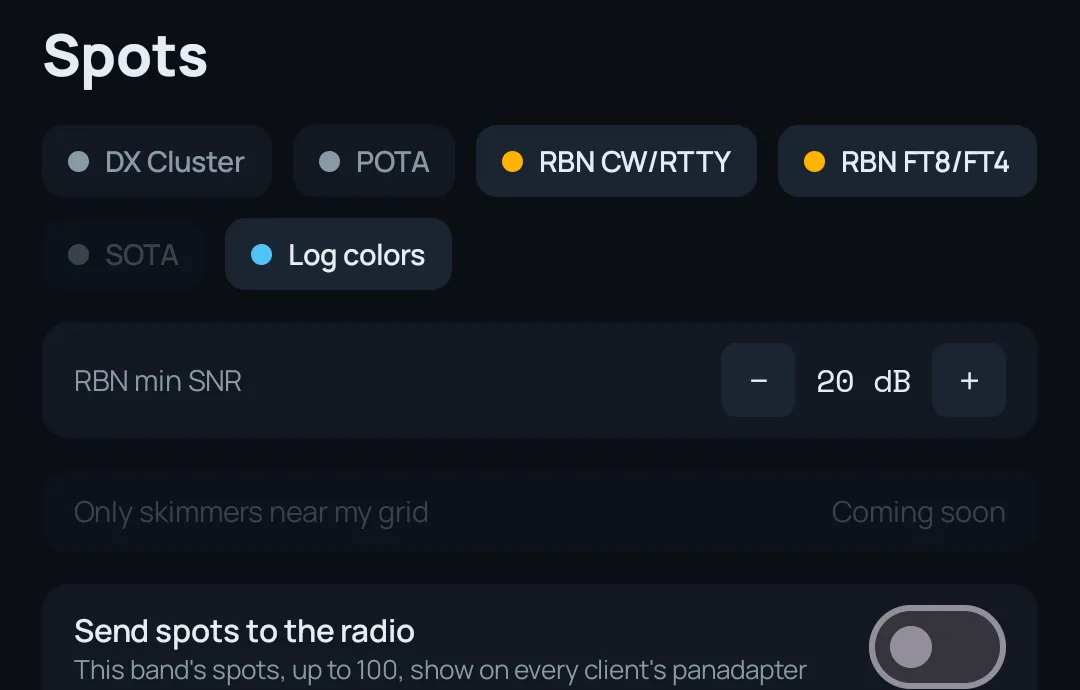
The Reverse Beacon Network’s skimmers hear thousands of stations calling CQ. SmartSDR AF now shows their spots in Tools › Spots, alongside DX Cluster and POTA, and on the panadapter.
Two new feeds
Turn on RBN CW/RTTY and RBN FT8/FT4. Each spot says who heard the station, the mode, the signal-to-noise ratio and, for CW, the speed. Tap a spot to tune to it and switch mode.
- Skimmers repeat themselves, so you see only the newest spot for each station on each band.
- RBN min SNR hides weak spots (10 dB to start).
- Spots disappear after 10 minutes.
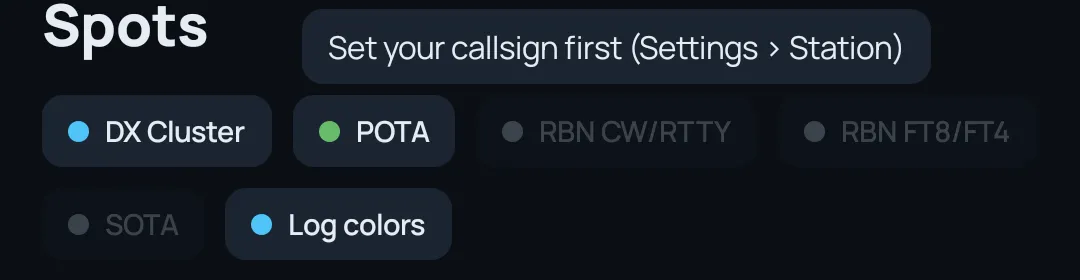
RBN logs you in with your callsign, so the feeds need one set in Settings › Station first. Until then the chips explain that.
Send spots to the radio
Turn on Send spots to the radio and the spots on the band your panadapter shows (up to 100) go into the radio’s own spot list, so SmartSDR and every other client on the radio see them too. Turn it off and they’re taken back off. It’s off until you turn it on, and it needs a real radio (not Demo mode).

Coming soon
SOTA spots and a filter for skimmers near your grid are on screen but marked “Coming soon”: SOTA’s spot API needs the project’s approval first, and RBN spots don’t say where a skimmer is.
What we tested
We tested the feeds with the live Reverse Beacon Network and the send-to-radio switch against our radio simulator. We haven’t yet checked that spots appear in SmartSDR on a real radio.
It’s coming in the next SmartSDR AF test build and reaches everyone with a later Google Play update. Feedback is welcome on our Discord.