SmartSDR AF 1.8.0 is our biggest update so far. It adds a live map of who’s hearing you, three new ways to drive the radio without touching the screen, antenna switching, split for DX, skimmer spots and more. Each feature has its own write-up; here’s the whole release at a glance, with a link to the detail on each one.
See who’s hearing you
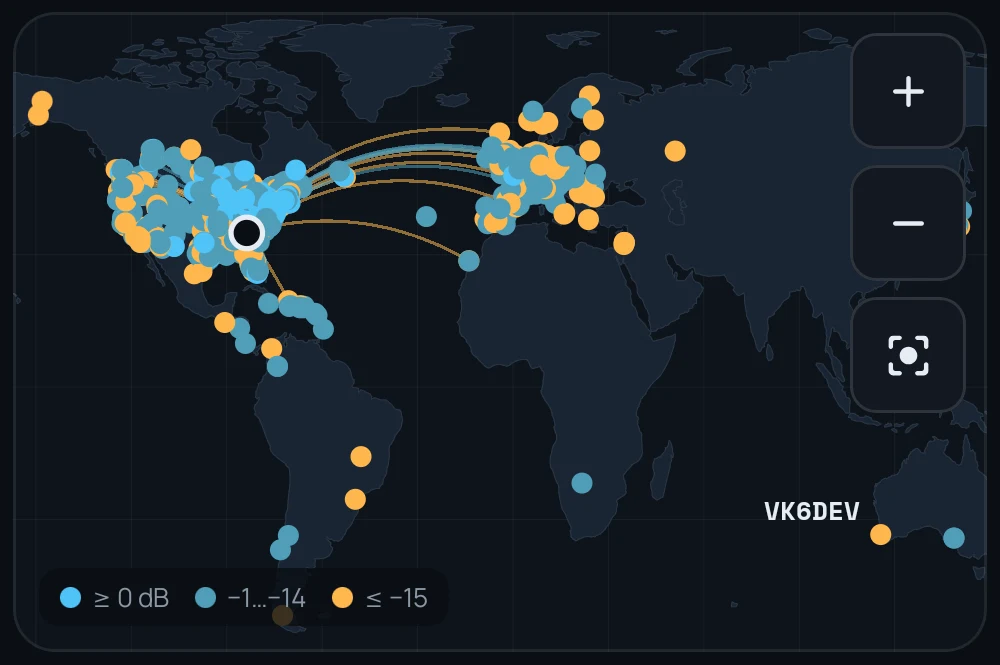
The headline feature is the Heard map, new under Tools › Operating. Call CQ and watch a world map fill in with every station that decoded your signal in the last hour, each one coloured by the report it sent, with distance and bearing a tap away. It reads from PSK Reporter, so it works from anywhere, even in Demo mode.
Alongside it, the radio now shows Reverse Beacon Network skimmer spots, and can push spots to the radio so they appear right on the panadapter.
Drive the radio without the screen
Three new ways to operate hands-off. Map a USB MIDI controller’s knobs and buttons to the radio with MIDI learn, or pair a Bluetooth LE MIDI controller for the same thing without a cable. Prefer keys? Set up keyboard shortcuts and a Bluetooth-button PTT and run the radio from a keyboard or a remote.
On the air, and after DX
Working a pileup is now one tap: go split for DX and the app sets up the transmit slice for you, and follows the radio if you change it there. For CW, zero beat and new RIT, XIT and split TX markers on the panadapter make it obvious where you’re transmitting.
Your station gear and display
If you run a 4O3A Antenna Genius, you can now pick antennas straight from the phone. And you can tune how the panadapter and waterfall look—averaging, frame rate, colour gain, black level and dBm range—so the display matches your band conditions.
Get it
All of this is in the SmartSDR AF 1.8.0 internal test build and reaches everyone with the Google Play update after that. Tell us how it goes on our Discord.